

本项目是一款面向开发者的技术工具,旨在将 Google AI Studio 的网页交互能力封装为符合 OpenAI、Gemini 和 Anthropic 三类主流大模型 API 规范的标准化服务接口。其实现机制基于浏览器自动化技术,将前端交互逻辑抽象为可编程、可复用的 RESTful API 接口。系统原生支持多账号管理与实时切换功能;在资源许可前提下,可通过账号轮换策略实现调用配额的弹性扩展,从而提升服务持续性与可用性。
功能层面,该工具全面支持函数调用(Function Calling / Tool Calls)机制;依托 Gemini 系列 API,可统一调度文本生成、图像生成、语音合成及 Imagen 系列多模态模型;同时配套提供可视化管理控制台,集成账号生命周期管理、会话监控及基于 VNC 的远程调试支持,显著提升运维效率与开发体验。
下面开始教程
步骤 1:部署容器
docker run -d \
--name aistudio-to-api \
-p 7860:7860 \
-v /root/AIStudioToAPI/auth:/app/configs/auth \
-v /root/AIStudioToAPI/data:/app/data \
-e SWITCH_ON_USES=500 \
-e FAILURE_THRESHOLD=10 \
-e API_KEYS=AX-0000565,AX-0000567 \
-e TZ=Asia/Shanghai \
--restart unless-stopped \
ghcr.io/ibuhub/aistudio-to-api:latest
参数说明:
- -p 7860:7860:API 服务器端口(如果使用反向代理,强烈建议改成 127.0.0.1:7860)
- -v /path/to/auth:/app/configs/auth:挂载包含认证文件的目录
- -v /path/to/data:/app/data:挂载统计数据持久化目录(/app/data/usage-stats.jsonl)
- -e API_KEYS:用于身份验证的 API 密钥列表(使用逗号分隔)
- -e TZ=Asia/Shanghai:时区设置(可选,默认使用系统时区)
API 服务将在 http://localhost:7860 上运行。
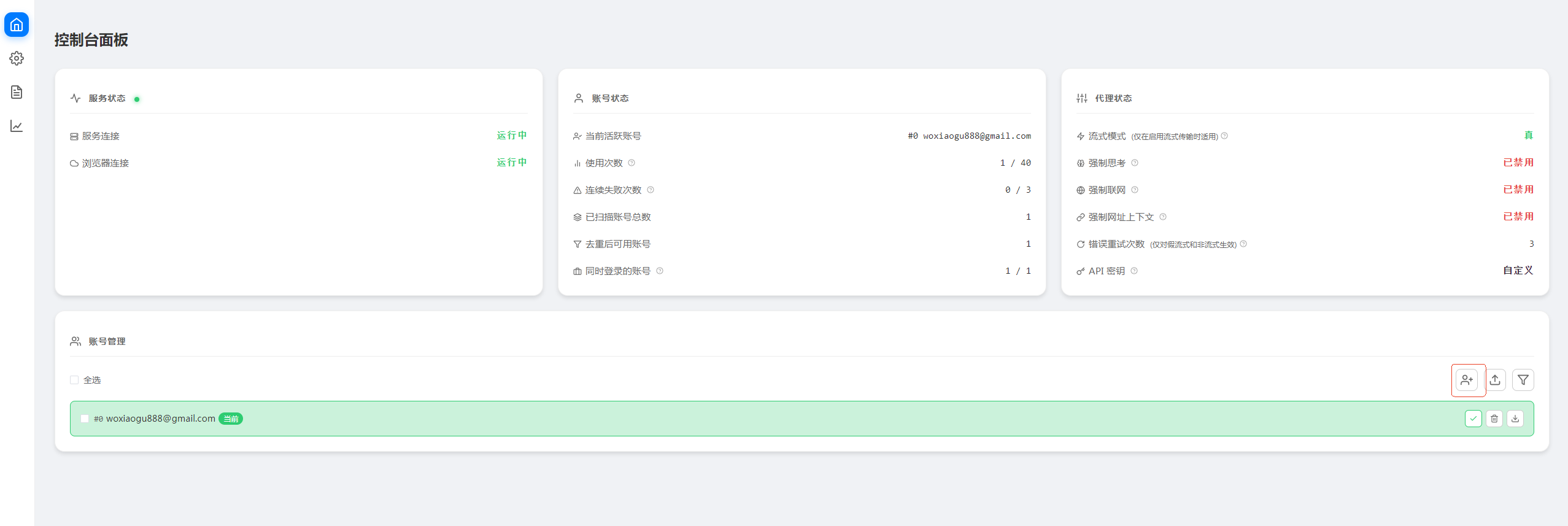
服务启动后,您可以在浏览器中访问 http://localhost:7860 打开 Web 控制台主页,在这里可以查看账号状态和服务状态。 请求统计数据会持久化保存到 /data/usage-stats.jsonl。
步骤 2:账号管理
部署后,您需要使用以下方式之一添加 Google 账号:
VNC 登录(推荐)
在浏览器中访问部署的服务地址(例如 http://your-server:7860)并点击「添加账号」按钮
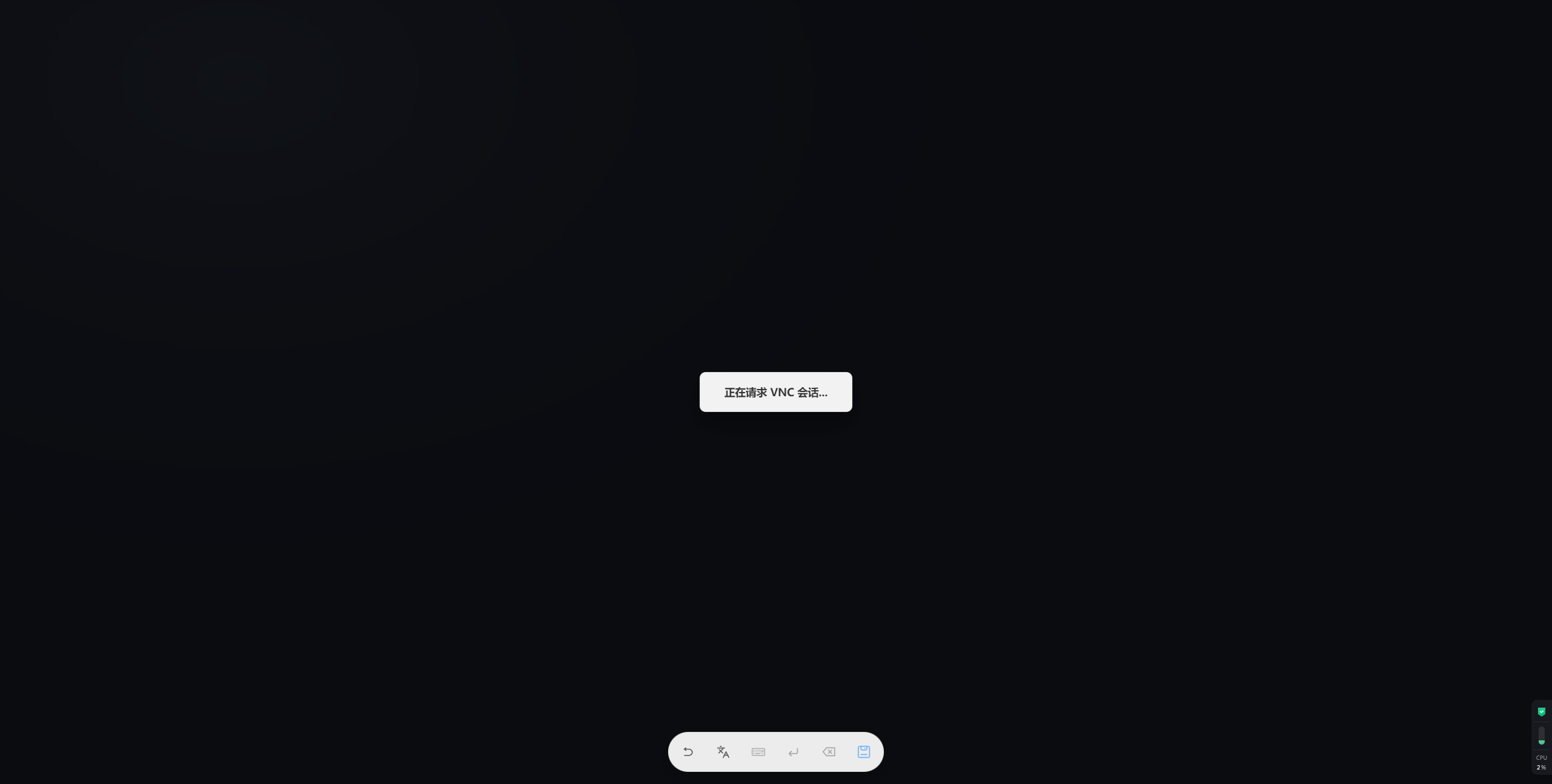
将跳转到 VNC 页面,显示浏览器实例
登录您的 Google 账号,登录完成后点击「保存」按钮
账号将自动保存为 auth-N.json(N 从 0 开始)
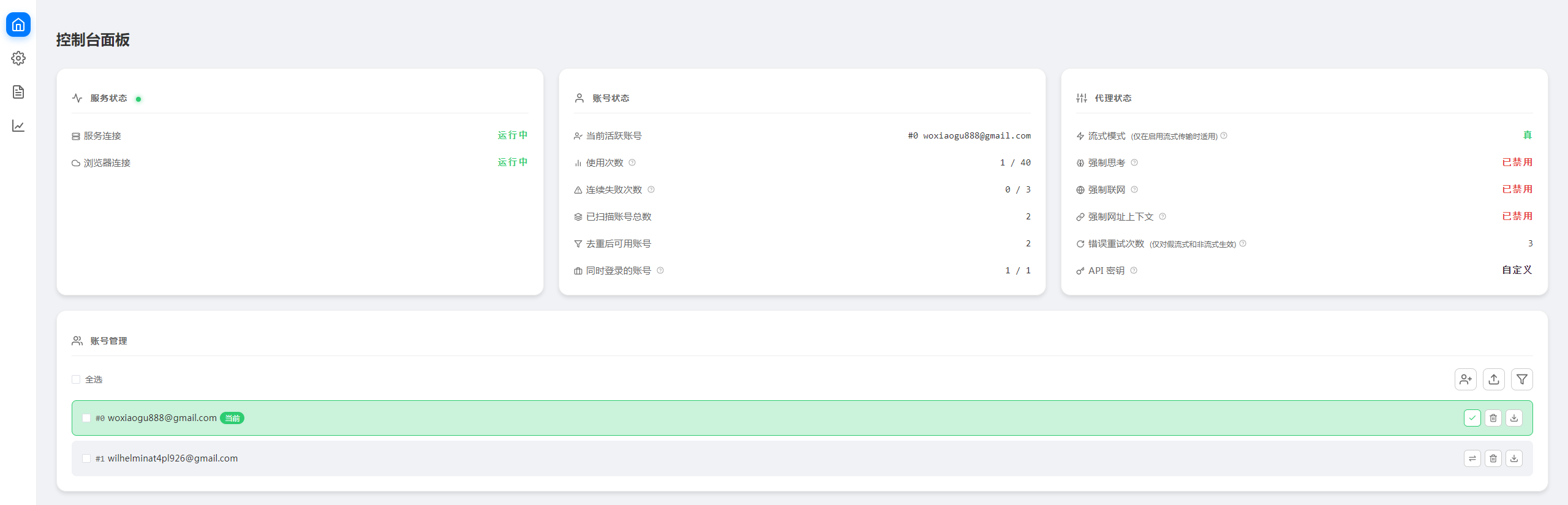
到此,账号添加就完成了;
步骤 3:使用 Nginx 反向代理(可选)
如果需要通过域名访问或希望在反向代理层统一管理(例如配置 HTTPS、负载均衡等),可以使用 Nginx。
步骤 4:测试验证,测试下是否能正常工作
OpenAI 兼容 API
curl -X POST http://localhost:7860/v1/chat/completions \
  -H "Content-Type: application/json" \
  -H "Authorization: Bearer your-api-key-1" \
  -d '{
    "model": "gemini-2.5-flash-lite",
    "messages": [
      {
        "role": "user",
        "content": "你好,最近怎么样?"
      }
    ],
    "stream": false
  }'

替换你的apikey和域名,然后测试下看看
能正常返回内容就说明OK啦!
查询可用的模型列表;
curl -X GET http://45.138.70.159:7860/v1/models \
  -H "Content-Type: application/json" \
  -H "Authorization: Bearer AX-PAUL-GU-20260417-0000565"
使用流式响应
curl -X POST http://localhost:7860/v1/chat/completions \
  -H "Content-Type: application/json" \
  -H "Authorization: Bearer your-api-key-1" \
  -d '{
    "model": "gemini-2.5-flash-lite",
    "messages": [
      {
        "role": "user",
        "content": "写一首关于秋天的诗"
      }
    ],
    "stream": true
  }'
生成图片
curl -X POST http://localhost:7860/v1/chat/completions \
  -H "Content-Type: application/json" \
  -H "Authorization: Bearer your-api-key-1" \
  -d '{
    "model": "gemini-2.5-flash-image",
    "messages": [
      {
        "role": "user",
        "content": "生成一只小猫"
      }
    ],
    "stream": false
  }'
流式生成
curl -X POST http://localhost:7860/v1/chat/completions \
  -H "Content-Type: application/json" \
  -H "Authorization: Bearer your-api-key-1" \
  -d '{
    "model": "gemini-2.5-flash-image",
    "messages": [
      {
        "role": "user",
        "content": "生成一只小猫"
      }
    ],
    "stream": true
  }'
Responses API
curl -X POST http://localhost:7860/v1/responses \
  -H "Content-Type: application/json" \
  -H "Authorization: Bearer your-api-key-1" \
  -d '{
    "model": "gemini-2.5-flash-lite",
    "input": "请用三句话总结函数式编程的核心思想。",
    "stream": false
  }'
流式 Responses API
curl -X POST http://localhost:7860/v1/responses \
  -H "Content-Type: application/json" \
  -H "Authorization: Bearer your-api-key-1" \
  -d '{
    "model": "gemini-2.5-flash-lite",
    "input": [
      {
        "role": "user",
        "content": [
          {
            "type": "input_text",
            "text": "写一首关于秋天的短诗。"
          }
        ]
      }
    ],
    "stream": true
  }'
Gemini 原生 API 格式
curl -X POST http://localhost:7860/v1beta/models/gemini-2.5-flash-lite:generateContent \
  -H "Content-Type: application/json" \
  -H "Authorization: Bearer your-api-key-1" \
  -d '{
    "contents": [
      {
        "role": "user",
        "parts": [
          {
            "text": "你好,最近怎么样?"
          }
        ]
      }
    ]
  }'
使用流式响应
curl -X POST http://localhost:7860/v1beta/models/gemini-2.5-flash-lite:streamGenerateContent?alt=sse \
  -H "Content-Type: application/json" \
  -H "Authorization: Bearer your-api-key-1" \
  -d '{
    "contents": [
      {
        "role": "user",
        "parts": [
          {
            "text": "写一首关于秋天的诗"
          }
        ]
      }
    ]
  }'
生成图片
curl -X POST http://localhost:7860/v1beta/models/gemini-2.5-flash-image:generateContent \
  -H "Content-Type: application/json" \
  -H "Authorization: Bearer your-api-key-1" \
  -d '{
    "contents": [
      {
        "role": "user",
        "parts": [
          {
            "text": "生成一只小猫"
          }
        ]
      }
    ]
  }'
流式生成
curl -X POST http://localhost:7860/v1beta/models/gemini-2.5-flash-image:streamGenerateContent?alt=sse \
  -H "Content-Type: application/json" \
  -H "Authorization: Bearer your-api-key-1" \
  -d '{
    "contents": [
      {
        "role": "user",
        "parts": [
          {
            "text": "生成一只小猫"
          }
        ]
      }
    ]
  }'
Imagen 图像生成
使用 imagen 系列模型通过 :predict 端点生成图像。
基础图像生成
curl -X POST http://localhost:7860/v1beta/models/imagen-4.0-generate-001:predict \
  -H "Content-Type: application/json" \
  -H "Authorization: Bearer your-api-key-1" \
  -d '{
    "instances": [
      {
        "prompt": "机器人手持红色滑板"
      }
    ],
    "parameters": {
      "sampleCount": 1
    }
  }'
批量生成多张图像
调整 sampleCount 可一次生成多张图像(最多 4 张)。
curl -X POST http://localhost:7860/v1beta/models/imagen-4.0-generate-001:predict \
  -H "Content-Type: application/json" \
  -H "Authorization: Bearer your-api-key-1" \
  -d '{
    "instances": [
      {
        "prompt": "夕阳下的未来城市,天空中有飞行汽车"
      }
    ],
    "parameters": {
      "sampleCount": 4
    }
  }'
TTS 语音合成
基础 TTS(默认声音)
curl -X POST http://localhost:7860/v1beta/models/gemini-2.5-flash-preview-tts:generateContent \
  -H "Content-Type: application/json" \
  -H "Authorization: Bearer your-api-key-1" \
  -d '{
    "contents": [
      {
        "role": "user",
        "parts": [
          {
            "text": "你好,这是一个语音合成测试。"
          }
        ]
      }
    ],
    "generationConfig": {
      "responseModalities": ["AUDIO"]
    }
  }'
指定声音
可选声音:Kore、Puck、Charon、Fenrir、Aoede
curl -X POST http://localhost:7860/v1beta/models/gemini-2.5-flash-preview-tts:generateContent \
  -H "Content-Type: application/json" \
  -H "Authorization: Bearer your-api-key-1" \
  -d '{
    "contents": [
      {
        "role": "user",
        "parts": [
          {
            "text": "你好,这是一个语音合成测试。"
          }
        ]
      }
    ],
    "generationConfig": {
      "responseModalities": ["AUDIO"],
      "speechConfig": {
        "voiceConfig": {
          "prebuiltVoiceConfig": {
            "voiceName": "Kore"
          }
        }
      }
    }
  }'
多人对话
对话内容写在 prompt 中,使用 multiSpeakerVoiceConfig 配置多个说话者的声音(最多 2 个)。
curl -X POST http://localhost:7860/v1beta/models/gemini-2.5-flash-preview-tts:generateContent \
  -H "Content-Type: application/json" \
  -H "Authorization: Bearer your-api-key-1" \
  -d '{
    "contents": [
      {
        "role": "user",
        "parts": [
          {
            "text": "TTS the following conversation between Joe and Jane:\nJoe: How are you today Jane?\nJane: I am doing great, thanks for asking!"
          }
        ]
      }
    ],
    "generationConfig": {
      "responseModalities": ["AUDIO"],
      "speechConfig": {
        "multiSpeakerVoiceConfig": {
          "speakerVoiceConfigs": [
            {
              "speaker": "Joe",
              "voiceConfig": {
                "prebuiltVoiceConfig": {
                  "voiceName": "Charon"
                }
              }
            },
            {
              "speaker": "Jane",
              "voiceConfig": {
                "prebuiltVoiceConfig": {
                  "voiceName": "Kore"
                }
              }
            }
          ]
        }
      }
    }
  }'
Anthropic 兼容 API
curl -X POST http://localhost:7860/v1/messages \
  -H "Content-Type: application/json" \
  -H "x-api-key: your-api-key-1" \
  -H "anthropic-version: 2023-06-01" \
  -d '{
    "model": "gemini-2.5-flash-lite",
    "max_tokens": 1024,
    "messages": [
      {
        "role": "user",
        "content": "你好,最近怎么样?"
      }
    ],
    "stream": false
  }'
使用流式响应
curl -X POST http://localhost:7860/v1/messages \
  -H "Content-Type: application/json" \
  -H "x-api-key: your-api-key-1" \
  -H "anthropic-version: 2023-06-01" \
  -d '{
    "model": "gemini-2.5-flash-lite",
    "max_tokens": 1024,
    "messages": [
      {
        "role": "user",
        "content": "写一首关于秋天的诗"
      }
    ],
    "stream": true
}' 赞
赞 

 打赏
打赏  生成海报
生成海报 














发表回复
评论列表(0条)